Citations and cross-references
Citing from KherveRef
kTeX works with KherveRef, the Kherve reference manager. Once KherveRef has a library open, kTeX can see it; kTeX only reads KherveRef's settings and never changes them.
References ▸ Cite… (also on the right-click menu) opens Insert citation:
- Choose the Library.
- Search by key, author, year or title. The list shows Key, Authors, Year and Title.
- Pick a Style:
\cite: number or author–year, depending on the bibliography style.\citep: in parentheses.\citet: author in the sentence.
- Also cite adds more keys to the same citation. You can also type keys by hand.
Every entry you cite is copied into the .ktex document, so the paper still compiles on another computer, or after you send it to a colleague, without the library.
The document's reference list
References ▸ References… shows every entry stored in the document.
- Search the list, and use Show to filter, for example to cited entries only.
- The columns are Cited, Key, Authors, Year, Title and Type.
- New and Delete add and remove entries. Save entry keeps edits to one.
- Import .bib… brings in a BibTeX file. From KherveRef… adds entries from a library.
- Cite cites the selected entry.
Tools ▸ Check citations lists any cited key that no library or .bib defines. Run it before you submit.
Bibliography style
References ▸ Style sets how citations and the reference list look:
| Style | Looks like |
|---|---|
| Author–year, sorted by author (plainnat) — default | (Smith 2020), list A–Z |
| Author–year, first names as initials (abbrvnat) | (Smith 2020), "J. Smith" |
| Author–year, in the order cited (unsrtnat) | (Smith 2020), list in citation order |
| Numbered, sorted by author (plain) | [1], list A–Z |
| Numbered, in the order cited (unsrt) | [1], list in citation order |
| Numbered, first names as initials (abbrv) | [1], "J. Smith" |
| IEEE (ieeetr) | [1], IEEE format |
Journal templates (Elsevier, ACS, APS …) may use their publisher's own style.
Footnotes
References ▸ Footnotes ▸ Footnote… inserts a numbered footnote at the cursor.
Cross-references
Anything with a label can be referred to: headings, figures, tables, numbered equations and theorems. The number updates itself when items move.
References ▸ Cross-reference… (also on the Insert tab and the right-click menu):
- Refer to: choose Section, Figure, Table, Equation or Label.
- Pick the item.
- Choose Show:
- Number (
\ref): "Figure 3". - Equation number (
\eqref): "(3)". - Page number (
\pageref): "page 12".
- Number (
- Click Insert, or Insert and close.
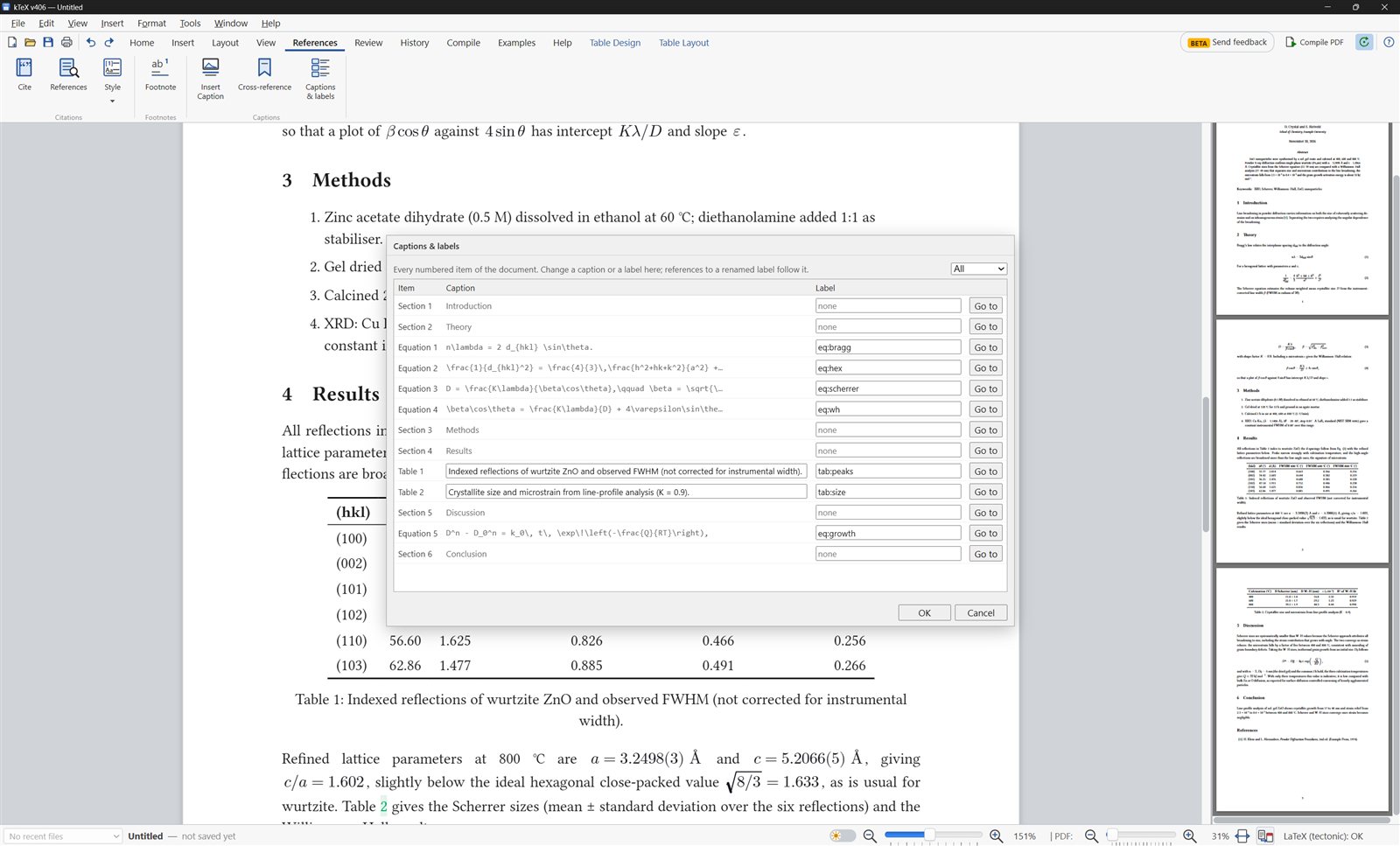
Give things labels as you create them (the figure, table and equation dialogs all have a Label box). References ▸ Captions & labels… lets you rename labels later, and their references follow.